For Mac · Windows later

Calm
under load.

The fan app that learns your Mac. Other fan apps hand you a curve to draw. CalmFan measures your machine and your work, then sets the fans itself. Earlier. Quieter. Nothing to tune.

Download free

Free for Mac. No payment, no trial.

The problem

Late, then loud.

A MacBook keeps its fans off while the chip climbs. Then it catches up all at once. CalmFan starts sooner and moves in small steps, so the sound changes slowly and the chip stays cooler.

01,0002,0003,000 load starts2 minutes fan speed, rpm in at 63°C in at 74°C
CalmFan macOS alone

Measured on a real MacBook Pro. Your Mac will differ.

How it works

It learns. You do nothing.

Other fan apps give you homework: at this temperature, that speed. You guess the numbers. CalmFan measures them on your Mac, and keeps them right.

1

Day one: it knows your chip

CalmFan recognises the chip in your Mac and starts with settings made for it. It works from the first minute.

2

Day three: it knows your Mac

It has measured how your Mac heats up and cools down, with your apps, on the charger and on battery. Then it sets the fans for that.

3

Every day after: it keeps up

New job, new game, summer heat. CalmFan keeps measuring and adjusts by itself. You never need to open Settings.

What you see

A number that means something.

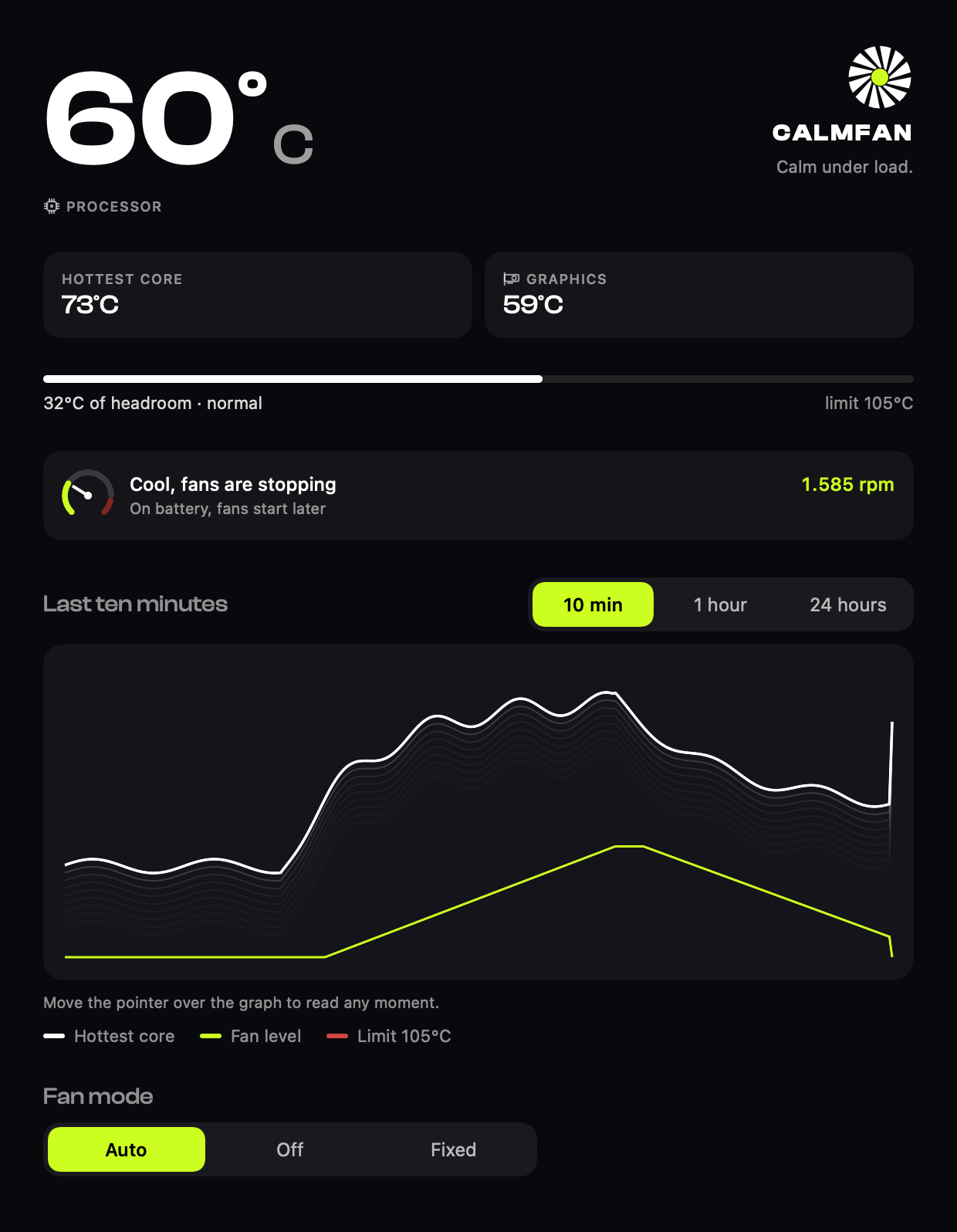
  • Headroom, not just heat"55°C of headroom, cool." Every temperature is shown against your chip's limit.
  • On your desktopA panel that sits behind your windows. You pick what it shows.
  • Quiet menu barOne temperature. The fan speed appears only while the fans turn.
The CalmFan main window with the processor temperature, headroom bar, fan status and a ten minute graph
Safety and privacy

When in doubt, it lets go.

Your Mac stays in charge

If a sensor fails, the Mac sleeps, or anything looks wrong, CalmFan hands the fans back to macOS at once.

A watchdog behind it

A separate guard releases the fans within seconds if CalmFan itself ever stops responding.

Learning stays on your Mac

No account. What CalmFan learns about your Mac never leaves it.

Price
Free
everything included
Download free
  • The engine that learns your Mac and your work, and sets the fans by itself
  • Temperatures in the menu bar and on the desktop
  • Smooth automatic fan control, with every safety rule
  • Starts cooling sooner for the apps that run hot
  • A quiet limit that follows your surroundings
  • No payment, no trial, no subscription
Questions

Before you ask.

Is it safe to control the fans?

Yes. CalmFan never runs a fan below its safe minimum, and at 95°C it goes to full speed, whatever it has learned. If a sensor fails or anything looks wrong, it hands the fans back to macOS at once.

Which Macs does it support?

Every Mac with an Apple chip. Fan control is tested on the 16-inch MacBook Pro, and uses careful general settings on other models. A MacBook Air has no fan, so there CalmFan shows temperatures only.

What about Windows?

It is planned for Windows 11, after the Mac version. Desktop PCs come first. Many laptops lock their fans, and there CalmFan can show temperatures but not drive the fans.

There are many fan apps. Why this one?

Because the others give you homework. They hand you a curve, and you guess the numbers. CalmFan learns your Mac and your work, sets the fans itself, and keeps adjusting when things change. You install it and forget it.

Is it really free?

Yes. Every feature is included. There is no payment, no trial and no card. We ask for your email before the download. That is all.

Why do you ask for my email?

So we can tell you about new versions and ask what you think of CalmFan. No ads, and you can say stop at any time.
Get CalmFan.

Free for Mac. No payment, no trial.

Download free

On Windows?

CalmFan for Windows 11 comes after the Mac version. Leave your email and we tell you when it is ready.

Get CalmFan

CalmFan is free. Tell us where to send news about it, and your download starts.

We use your email to tell you about new versions and to ask what you think. No ads. You can say stop at any time. Privacy